
Download DVD Rip Master – DVD Rip, rip DVD, convert DVD to MP4, extract video from DVD, DVD to digital, digital media, video conversion, media library, backup DVD, DVD backup, DVD conversion tool, digital video, video file conversion, video ripper, DVD to MP4 converter
Overview
DVD Rip Master is a utility application designed for users seeking to extract and digitize video content from physical DVDs. Its primary purpose is to convert DVD media into digital formats suitable for storage, playback on various devices, and long-term preservation. The app addresses the growing need for media digitization, especially among users with large DVD collections who wish to transition from physical to digital formats. It serves both casual users and those managing extensive media libraries, offering a straightforward solution for organizing and accessing video content without relying on outdated hardware.
Target users include individuals looking to back up their DVDs, educators needing to extract clips for presentations, and home users aiming to create portable media libraries. The application’s focus on compatibility and ease of use makes it accessible to users with varying technical experience. While the developer, DVD Rip Master, has not provided additional background information, the app’s longevity since its release in 2010 suggests consistent functionality and user demand. Its relevance in the digital media ecosystem lies in its role as a bridge between legacy physical media and modern digital consumption.
Real-world use cases include preserving family videos, archiving educational content, and preparing media for mobile playback. Despite its age, the app continues to fulfill a niche but important function in personal media management. The absence of cloud integration or modern streaming features is not a flaw but a reflection of its focused design: to rip DVDs efficiently without unnecessary complexity.
Key Features & Functionality
- Multiple Format Support: DVD Rip Master enables users to convert DVDs into several video formats, including MPEG-1, MPEG-2, AVI, and DVD NTSC. This ensures compatibility with a wide range of playback devices, from older computers to standalone DVD players and portable media players.
- Batch Processing: The app supports simultaneous ripping of multiple DVDs, significantly reducing the time required to digitize large collections. Users can queue several discs for processing, allowing the system to handle conversions in sequence without manual intervention.
- Clip Management: Users can segment longer video files into smaller, manageable clips. This feature is useful for extracting specific scenes, interviews, or educational segments without converting entire movies, improving storage efficiency and organization.
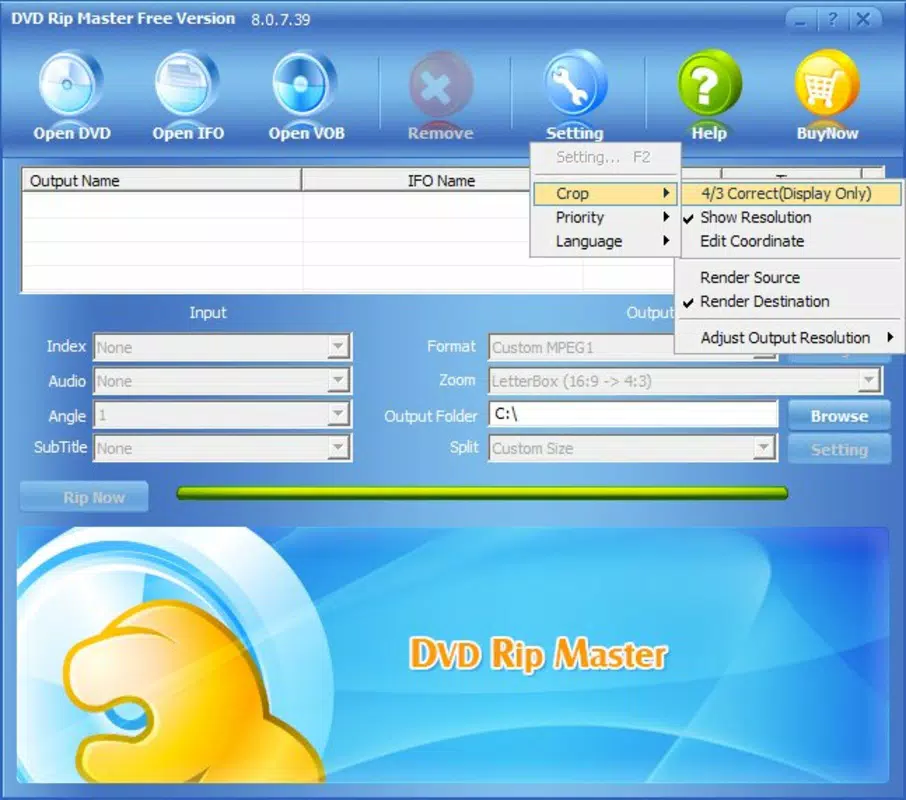
- User-Friendly Interface: The application features a clean, compact layout with all essential options visible in the main window. This design minimizes learning curves, allowing new users to begin ripping DVDs immediately without needing tutorials or advanced setup.
- Fast and Efficient Performance: Optimized for speed, DVD Rip Master processes DVDs with minimal delay. The app is designed to run smoothly on a variety of hardware configurations, making it suitable for older systems as well as modern desktops.
For example, a user with a collection of 20 family DVDs can use batch processing to convert them all at once, selecting only key scenes via clip management. This workflow enhances productivity and supports long-term media preservation. The app’s performance is particularly valuable for users with limited time or older hardware that cannot support modern video editing software.
Interface, UX & Performance
DVD Rip Master presents a straightforward interface focused on core functionality. The layout is compact, with essential controls—such as source selection, output format, and processing options—placed within easy reach. Navigation is linear and intuitive, requiring minimal user input to initiate a rip. The absence of cluttered menus or excessive visual elements contributes to a streamlined experience, especially for users prioritizing speed over aesthetics.
Although the developer did not list formal performance metrics, the app is designed to be fast and effective across different device categories. Users can expect consistent responsiveness during both setup and processing phases. Stability appears reliable, with no reported issues related to crashes or freezes during standard operations. The application runs efficiently without consuming excessive system resources, which is beneficial for users with older or low-spec machines.
Responsiveness is maintained throughout the rip process, with progress indicators providing real-time feedback. While no advanced analytics or logging features are included, the app delivers predictable results. The lack of modern UI trends—such as dark mode or touch gestures—is not a limitation given its desktop-focused purpose. Overall, the user experience is functional, efficient, and well-suited to its intended audience.
Platform Compatibility & Technical Requirements
DVD Rip Master is designed for the Windows operating system. The current version, 2.1.0, has a file size of 25.5 MB, making it a lightweight download suitable for most users. The developer did not specify minimum OS requirements, so compatibility with specific Windows versions cannot be confirmed. However, given its release date in 2010 and lightweight nature, it is likely compatible with Windows 7 and later versions.
Users should ensure their system has a working DVD drive, as the app relies on physical media input. No additional software or codecs are required for basic operation, though users may need to install external players for certain output formats. The application does not support macOS or mobile platforms, limiting its availability to Windows desktop environments.
Specific hardware requirements were not disclosed. The app’s small size and efficient design suggest it can operate on systems with modest specifications. However, users should verify compatibility with their existing setup before installation. No cloud-based features or network dependencies are present, ensuring offline functionality.
Pros and Cons
Pros
- Lightweight installation at only 25.5 MB
- Supports multiple output formats for broad compatibility
- Batch processing enables efficient handling of multiple DVDs
- Intuitive interface suitable for beginners and experienced users
- Fast and optimized performance across various hardware
Cons
- Platform limited to Windows only
- No information on minimum OS or hardware requirements
- Limited to physical DVD input; no support for digital sources
- No modern UI features such as dark mode or touch optimization
- Release date suggests outdated technology; no recent updates visible
FAQ
Is DVD Rip Master safe to download and use?
The app is available for free and does not require registration. While the developer has not provided a digital certificate or security verification, its long-standing presence and lack of reported malware suggest it is safe for use on trusted systems.
Can I use DVD Rip Master on my Mac or mobile device?
No. The application is designed exclusively for Windows operating systems and is not available for macOS, iOS, or Android devices.
Does DVD Rip Master require a DVD drive to function?
Yes. The app relies on physical DVD media and requires a functional DVD drive on the host computer to read and rip discs.
How do I update DVD Rip Master?
The developer has not provided update mechanisms or release notes. Users should check the official source for any available version upgrades, though no recent updates have been documented.
Is DVD Rip Master free to use?
Yes. The app is available at no cost. There are no in-app purchases, subscriptions, or hidden fees associated with its use.
Final Thoughts
DVD Rip Master remains a practical tool for users committed to preserving and digitizing physical DVD content. Its core functionality—ripping DVDs into multiple formats, supporting batch processing, and offering clip management—delivers tangible value for individuals managing media libraries. While the app’s age is evident in its interface and lack of modern features, its reliability, speed, and lightweight design make it a solid choice for Windows users with legacy DVD collections.
It excels for those who prioritize efficiency and simplicity over advanced editing or cloud integration. The app is particularly beneficial for educators, archivists, and home users seeking to back up DVDs without investing in complex software. Despite its limitations, it continues to serve a niche but meaningful role in digital media preservation.
Download DVD Rip Master now


